Git to Know You · Part 5
#5. Git to Know You: Terraform
Published July 13, 2025 · Updated August 8, 2026
This one’s a big deal. No exaggeration.
Terraform was one of the tools that changed how I thought about infrastructure. Instead of treating a cloud environment like a collection of things someone clicked together in a console, infrastructure became something we could define, review, repeat, and improve as a team.
That is the part I want beginners to understand first. Terraform is not valuable because HCL is fashionable. It is valuable because infrastructure stops living only in someone’s memory.
If you are tired of copying cloud-console steps into a README, or manually rebuilding an environment from a checklist, infrastructure as code is the next conversation to have.
Beginner note:
This series is written for people learning SRE, cloud, and infrastructure tooling. You do not need to memorize Terraform syntax before it becomes useful. Start by understanding the workflow: describe the desired infrastructure, review the proposed change, apply it deliberately, and keep the configuration under version control.
What is Terraform?
Terraform is HashiCorp’s infrastructure-as-code tool. You describe infrastructure in HCL (HashiCorp Configuration Language), and Terraform compares that desired configuration with the infrastructure it manages.
Instead of manually launching an EC2 instance or configuring infrastructure through a web console, you can represent it in .tf files that are versionable, reviewable, and reusable.
A small resource might look like this:
resource "aws_instance" "web" {
  ami           = "ami-0123456789abcdef0"
  instance_type = "t3.micro"

  tags = {
    Name = "web-server"
  }
}
The exact AMI or instance type is not the important lesson. The important part is that the desired configuration now exists as code that another person can inspect before anything changes.
Why Terraform?
A few characteristics make Terraform especially useful in infrastructure work:
- Declarative configuration — describe the desired result instead of scripting every procedural step.
- Reviewable changes — keep configuration in Git and use pull requests to review infrastructure changes.
- Reusable modules — turn repeated infrastructure patterns into shared building blocks.
- Provider ecosystem — manage resources across cloud and SaaS platforms through providers.
- Planning before change — use
terraform planto inspect what Terraform intends to change before applying it.
Terraform is not the only good infrastructure-as-code option. AWS CloudFormation, AWS CDK, Azure Bicep, Pulumi, OpenTofu, and other tools solve overlapping problems with different tradeoffs. The important professional skill is understanding infrastructure as code and choosing the implementation that fits the environment.
The basic Terraform workflow
A normal beginner workflow is pleasantly boring:
terraform fmt
Formats Terraform configuration consistently.
terraform validate
Checks whether the configuration is syntactically valid and internally consistent.
terraform plan
Shows the proposed infrastructure changes before they are applied.
terraform plan -out=tfplanterraform apply
Applies the reviewed plan.
terraform apply tfplanterraform destroy
Removes infrastructure managed by the configuration when that is actually the intended outcome.
The safety does not come from Terraform magically knowing what you meant. It comes from combining configuration, version control, review, planning, testing, and deliberate application.
State matters more than beginners expect
Terraform uses state to map configuration to the infrastructure it manages. For a solo experiment, local state can be enough. For a team, state usually belongs in a remote backend with access controls, recovery planning, and locking where supported.
For AWS S3 backends, current Terraform supports S3-based state locking with use_lockfile = true. Older guidance commonly paired S3 with a DynamoDB table for locking; HashiCorp now marks DynamoDB-based locking as deprecated.
A simplified backend configuration can look like this:
terraform {
  backend "s3" {
    bucket       = "example-terraform-state"
    key          = "app/production.tfstate"
    region       = "us-west-2"
    use_lockfile = true
  }
}
State can contain sensitive values, so treat it like operational data, not a harmless generated file. Restrict access, enable recovery controls such as S3 bucket versioning where appropriate, and never casually commit state files to Git.
The Terraform Registry
The Terraform Registry remains one of the most useful places to learn Terraform because provider and module documentation lives next to practical configuration examples.
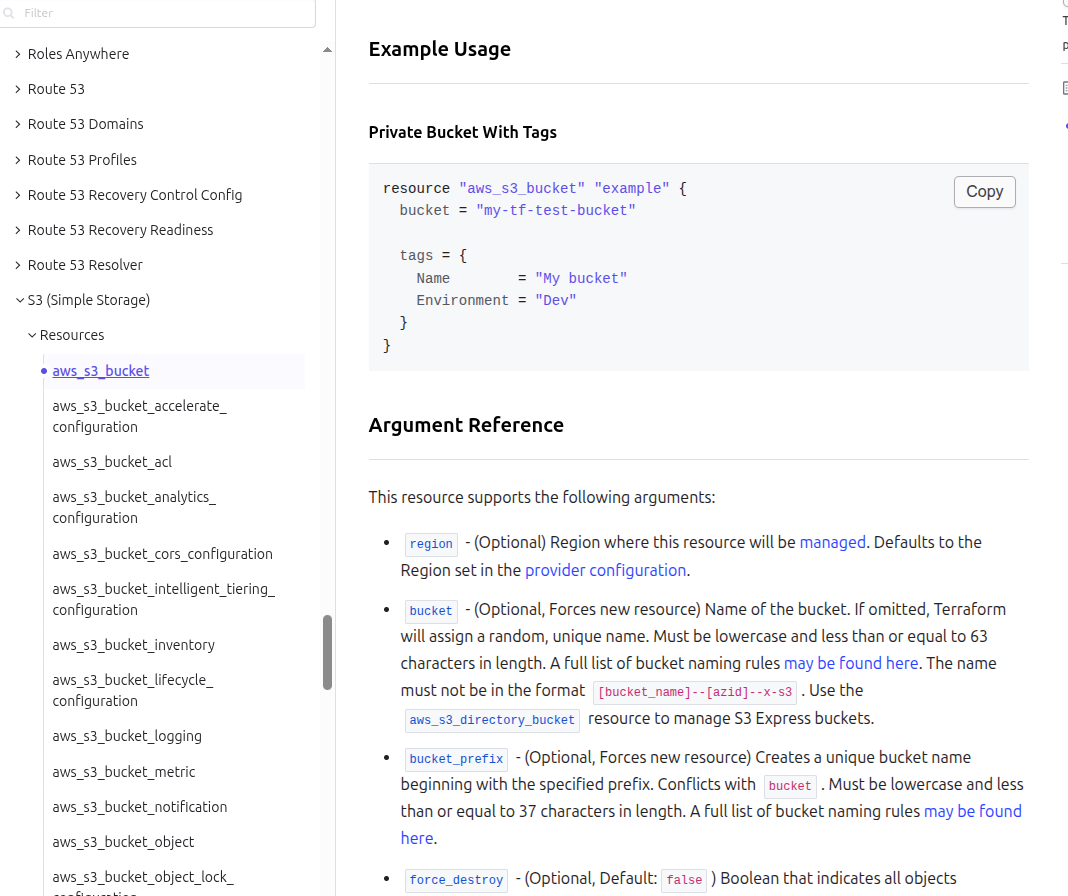
When I am working with an unfamiliar resource, I would rather start with the provider documentation than guess an argument name from memory. That habit matters even more now that AI tools can confidently generate configuration that looks correct while using an outdated or nonexistent option.
A Real Story: How Terraform Helped My Team
Before Terraform, our team had completed a move from a traditional on-prem environment to AWS. We were not using Kubernetes or containers yet. We had EC2, Windows, IIS, and a monolithic application architecture.
Infrastructure work was slow and inconsistent. We manually resized EC2 instances, bootstrapped machines, changed registry settings, and configured scheduled tasks. If someone changed something directly in the AWS console, the rest of the team might not know until we had a reason to investigate it.
Then we adopted Terraform.
We started small by codifying infrastructure and putting those definitions into Git. That changed more than provisioning. We could review infrastructure changes in pull requests, reuse patterns, and have a shared record of what the environment was intended to look like.
Our toil dropped significantly, by at least 25 percent. Engineers spent less time reproducing console work, and development environments became much easier to create consistently. Just as important, infrastructure decisions became visible to the team instead of living in individual memory.
That was the real win for me. Terraform turned infrastructure from something we operated manually into something we could reason about together.
Modules and reuse
Modules let teams package repeatable infrastructure patterns behind inputs and outputs. A network, service baseline, or other common component can be defined once and consumed consistently across environments.
That does not mean every resource needs to become a module. Over-abstraction can make simple infrastructure harder to understand. Start with repetition you actually have, then extract the pattern when doing so makes the system clearer.
Where Terraform can hurt
Terraform is powerful, but it introduces responsibilities of its own:
- State needs deliberate protection and access control.
- Plans still require human review. A successful plan is not proof that the proposed change is a good idea.
- Provider and module upgrades can introduce change. Pin versions intentionally and review upgrades.
- Drift still exists. Out-of-band changes can make reality differ from configuration.
- Large configurations can become difficult to reason about. Good boundaries matter more than clever abstractions.
And Terraform is not automatically the right answer for every organization. Native cloud tools or another IaC approach may fit a particular platform, team, or operating model better.
Final Thoughts
Terraform brings software-delivery discipline to infrastructure: version control, review, reuse, repeatability, and an explicit change plan.
Start small. Define something you understand. Put it in Git. Run fmt, validate, and plan. Read the plan instead of treating it as ceremonial output. Then build from there.
The syntax is learnable. The more important lesson is learning to treat infrastructure changes as changes that deserve the same engineering discipline as application code.
Next in the Git to Know You series: GitHub Actions.