Git to Know You · Part 4
#4. Git to Know You: Git
Published July 8, 2025
It’s time for Git. This is an intervention. Do not argue. Do not yell at me about where it sits on this list. We are saying this because we care about you. It is Git time.
I placed it here intentionally. Your team and basic processes should be in place before introducing Git, in my opinion. There is a learning curve. It becomes much easier when SREs discover the benefits, the simplicity, and even the headaches together as a team. I recommend creating a blameless beginner environment where everyone uses Git locally at minimum.
But believe me. Do not move past this point without Git in place.
So let’s talk about Git. Not describing someone as a jerk. The tool. If you have worked in software, someone has probably told you to “just push it to Git.” Sounds simple until you are staring at the terminal wondering if git reset --hard is about to delete your entire project.
Git is the backbone of modern software collaboration. It is a version control system, but it is also a safety net, a collaboration engine, and a historical archive of every bad idea you rolled back. Whether you are shipping features, fixing bugs, or undoing a disaster, Git keeps track of it all.
Let’s clear something up right away. Git and GitHub are not the same thing.
Git is the open-source version control system. It is the engine that tracks changes, branches, merges, and commits. You can use Git entirely on your local machine without ever connecting to the internet. It is distributed, meaning every clone contains the full repository history.
GitHub is a cloud platform that hosts Git repositories and adds collaboration features. Think of it as a collaboration layer on top of Git, complete with issues, pull requests, project boards, discussions, and integrations. Platforms like GitLab and Bitbucket offer similar functionality with different approaches.
If Git is your toolbox, GitHub is your workshop.
Disclaimer:
Everything in this blog is written with beginners in mind. If you’re curious about Site Reliability Engineering and do not know where to start, you are exactly who this is for. I am not here to throw a bunch of jargon at you or assume you already know everything. The goal is to keep it clear, practical, and beginner friendly. Whether you are switching roles, just getting started in tech, or exploring SRE for the first time, welcome. This is the material I wish I had been introduced to earlier.
Why Git?
Git provides version history, enables safe collaboration, and allows experimentation without fear. It is fast, reliable, and used everywhere from solo projects to enterprise deployments.
For SREs, Git is not only about application code. We store Terraform configurations, Kubernetes manifests, documentation, and even incident reports in Git. It allows us to automate changes, track accountability, and revert when something goes wrong.
Git also plays a central role in CI/CD pipelines. Deployments triggered by commits, release tagging, and automated testing workflows all start with Git. Without it, collaboration quickly turns into confusion.
When paired with GitHub or similar platforms, collaboration becomes structured. Code reviews, issues, tagging teammates, and triggering automated tests all build on top of Git. But the foundation, the versioning, branching, and history, is always Git.
A Real Story: How Git Helped My Team
At the small company I joined right out of school, we initially had no version control. No Git. No Subversion. Nothing. We shared scripts over chat and email. Sometimes we walked to each other’s desks to review code. Looking back, it feels unreal.
As the company grew, that approach became unsustainable. We introduced Git. Almost immediately, collaboration improved. We could see what changed, who changed it, and when. We adopted Bitbucket for remote collaboration, and the workflow started to mature. We stopped overwriting each other’s work and began building with intention.
When the pandemic forced everyone remote, Git and Bitbucket kept everything stable. Code reviews, branching strategies, and merges continued without disruption. Having that system in place created structure during an otherwise chaotic time.
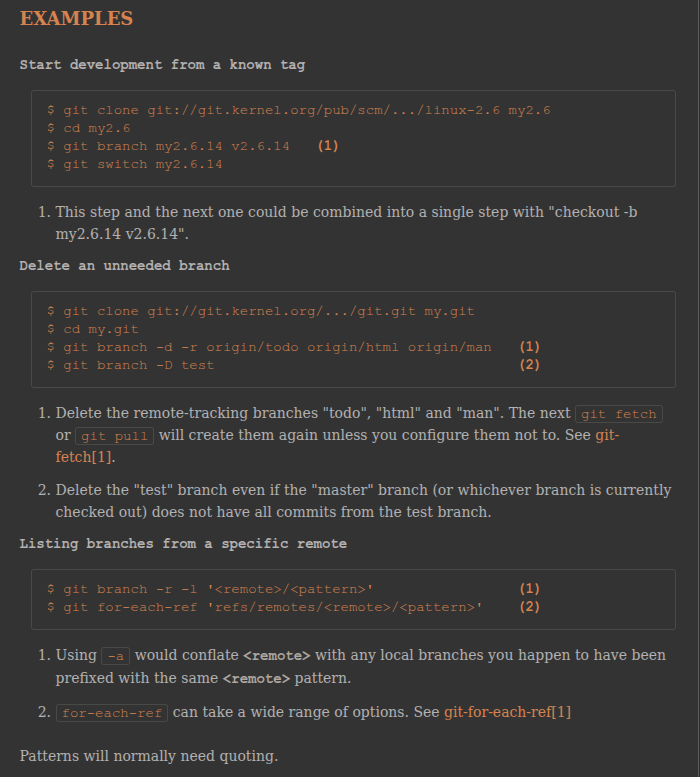
Git CLI
Benefits
-
History and Traceability
Every change is recorded. You know who changed what and when. -
Safe Collaboration
Multiple people can work on the same codebase without breaking each other’s progress. -
Branching and Experimentation
Test new ideas or fixes in isolated branches without affecting production. -
Audit Ready
Ideal for compliance, debugging, and reviewing long-term change history. -
Integrations Everywhere
Git integrates with CI/CD pipelines, ticketing systems, and cloud platforms. -
Offline Capable
Commit, branch, and review history without internet access. -
Platform Flexibility
Use Git locally or connect it to GitHub, GitLab, Bitbucket, or other hosting services.
Drawbacks
-
Steep Learning Curve
The command line can feel intimidating. Commands likerebase,cherry-pick, andstashrequire practice. -
Merge Conflicts
When two people edit the same file, conflicts happen. They are manageable but frustrating. -
Overkill for Tiny Projects
For a single script or temporary file, Git may feel excessive. -
Tooling Decisions
Choosing between GitHub, GitLab, Bitbucket, and others can create decision fatigue. -
Poor Git Hygiene Has Consequences
Infrequent commits or pushing broken changes tomaincan create long-term headaches.
Cost
Git is free and open-source. Hosting platforms such as GitHub, GitLab, and Bitbucket offer generous free tiers for individuals and small teams.
Enterprise features, private repositories at scale, or self-hosted options may require paid plans. However, most teams can go very far before needing to spend money.
Bottom Line
Git is essential for anyone working in technology. Whether you are writing application code, managing infrastructure, or maintaining documentation, Git keeps you organized and in control.
If you have ever wanted a reliable undo button for your projects, this is it.
Stay tuned for the next tool in the Git to Know You series!