Git to Know You · Part 7
#7. Git to Know You: Cursor
Published February 25, 2026 · Updated August 8, 2026

AI in your editor is not a gimmick. It’s a force multiplier.
But only if you use it correctly.
Cursor is not magic, and it is definitely not a replacement for understanding Terraform, networking, IAM, CI/CD, or why your pipeline just failed at 2:00 AM. What it can do is compress the feedback loop between a question, the code in front of you, and the next thing you want to test.
That matters because modern AI editors have moved well beyond autocomplete. Cursor now has an Agent that can explore a codebase, edit multiple files, run tools and terminal commands, and work through larger tasks. It also supports reusable project Rules so teams can give the agent persistent instructions about architecture, style, or workflow.
Those capabilities make the tool more useful.
They also make judgment more important.
What is Cursor?
Cursor is an AI-powered code editor built on the VS Code foundation. It can use project context when answering questions, proposing edits, or working through a larger task.
Instead of copying a Terraform snippet into a browser chat and trying to reconstruct the surrounding project in your prompt, you can work with the actual files and repository context in the editor.
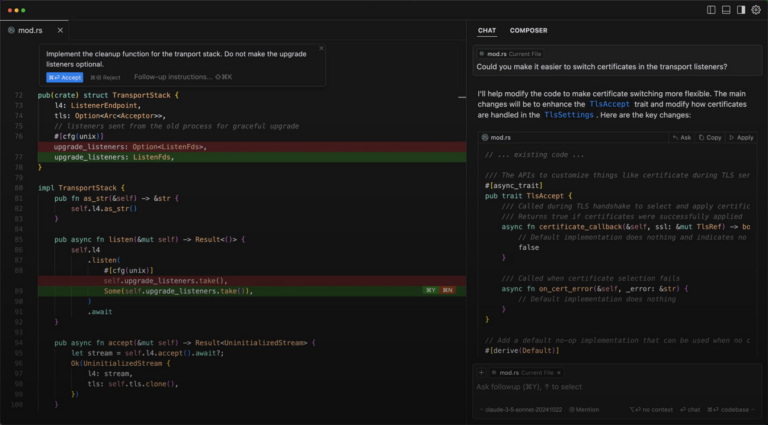
The tighter the context, the more useful the conversation can become. But context does not make the model infallible. It only gives it a better chance of understanding the problem you are actually trying to solve.
How I Actually Use It
I do not use Cursor as a button that says “build the whole thing for me.” Most of the time, I am dealing with infrastructure definitions, troubleshooting, configuration decisions, or a workflow that already has constraints.
Cursor fits into that work as a thinking partner.
When I am working in Terraform, for example, I will use it to sanity-check a pattern or explore alternatives. If a module feels repetitive, I might ask whether the duplication can be abstracted cleanly. If I am reviewing backend configuration, I can ask it to pressure-test what I am doing before I run terraform plan.
The useful part is not that AI eliminates validation. It shortens the cycle between:
“I think this makes sense.”
and
“I know what I need to verify next.”
Agent changes the scale of the request
A chat answer is one thing. An agent that can inspect files, make edits, run commands, and iterate on failures is different.
Cursor’s current Agent is designed for larger tasks such as refactoring or multi-file changes. That can be genuinely useful because the tool can keep more of the workflow together instead of making you copy each intermediate step manually.
It also increases the blast radius of a bad assumption.
The more autonomy you give an AI tool, the more important your guardrails become:
- work on a branch;
- review the diff;
- keep tests and validation close to the change;
- do not give a tool credentials or access it does not need;
- understand which commands it is allowed to run;
- treat a successful command as evidence, not proof that the design is correct.
Automation does not remove ownership. It changes where you exercise it.
Rules are more interesting than a giant prompt
Cursor supports project Rules that live with the codebase and can be version controlled. Rules can describe conventions, architecture decisions, workflows, or other persistent context the agent should follow.
That is much more useful than pasting the same paragraph into every conversation.
If a repository has a known testing command, naming convention, deployment boundary, or rule such as “never modify production configuration without an explicit approval step,” that knowledge can live with the project instead of depending on one person’s memory.
This is also where AI-assisted engineering starts looking less like a clever editor feature and more like an operating model.
The quality of the instructions around the agent matters almost as much as the model itself.
Using It as an Advisory Tool
Sometimes I do not want code. I want another pass at the reasoning.
If I am reviewing a CI workflow, I might ask what could race, which permissions look too broad, or whether a caching strategy could create inconsistent builds. When I am thinking through infrastructure changes, I can ask about edge cases or failure modes I have not considered.
Cursor will still be wrong sometimes. It can confidently suggest an option that does not exist, misunderstand provider behavior, or recommend something that is technically valid but wrong for the environment.
That does not make the tool useless.
It means the answer is a draft input to your decision, not the decision itself.
Production Debugging and Reality Checks
AI is especially tempting during debugging because everybody wants the incident to end faster.
Cursor can help summarize logs, explain a stack trace, compare configuration, or suggest where to inspect next. That can reduce the time spent turning a wall of output into a working hypothesis.
But debugging is exactly where overconfidence becomes expensive.
I still validate everything. I still run terraform validate. I still review Git diffs. I still test outside production. I still compare important technical claims with the actual documentation and environment behavior.
If you treat AI like an authority, you will eventually get burned.
If you treat it like a very fast collaborator whose work needs review, it becomes much more valuable.
Privacy and access are engineering decisions too
The useful AI workflow has another side: your code and prompts can contain sensitive information.
Cursor currently offers Privacy Mode options and documents how code indexing, requests, and agent environments are handled. Those settings matter, but a privacy toggle is not a substitute for understanding what data you are sending and what access you grant.
Background or more autonomous agents deserve even more scrutiny because they may run code, access repositories, or use network connectivity as part of the task.
The rule I use is simple: do not give an AI tool information or access that would be unacceptable if the workflow behaved in an unexpected way.
That is the same principle we should already be using for CI systems, third-party integrations, and automation accounts.
Where It Really Makes an Impact
The biggest benefit is still friction reduction.
Less context switching.
Less time hunting for syntax you almost remember.
Faster exploration of alternatives.
Quicker first passes at repetitive documentation or refactoring.
A shorter distance between an idea and something you can actually validate.
When reliability work, delivery, troubleshooting, and documentation are all competing for attention, those minutes compound.
Cursor does not make your existing knowledge unnecessary.
It helps that knowledge move faster.
Where It Falls Short
Cursor does not automatically understand your organization’s real constraints.
It may not know the compliance rule that changes the design, the customer commitment that changes the rollout plan, the legacy dependency that cannot be upgraded yet, or the budget that makes the theoretically elegant architecture unrealistic.
Those constraints are part of engineering too.
AI can reason over the context you give it. It cannot guarantee that you gave it all the context that matters.
Used blindly, AI makes you dangerous.
Used deliberately, it makes you faster.
Final Thoughts
The original version of this article called Cursor a force multiplier. I still think that is the right description.
What changed is the amount of work the tool can now attempt on your behalf.
As AI editors become more agentic, the important skill is not writing the cleverest prompt. It is designing a workflow where the AI can move quickly without removing verification, source control, tests, access boundaries, and human ownership.
That is the direction engineering is moving anyway.
Trust, but verify.
You are still responsible for the result.